
WordPress plugin
WordPress SEO tools that check your writing as you type
DidYouSEO is a free on-page SEO plugin for WordPress. It writes the tags search engines and social networks read, checks each post while you write it, and audits the published page for 40+ technical problems.
Good writing still needs the right tags and a technical check
A post can read well and still go out with a missing meta description, a title Google cuts off, no image for social shares, or a slow page. Those problems are invisible in the editor, so they get found weeks later, if at all.
DidYouSEO puts the checks where you write. The tags are filled in for every post, the editor tells you what to fix before you publish, and the audit looks at the page visitors and Google actually load.
What does the DidYouSEO WordPress plugin do?
Search appearance
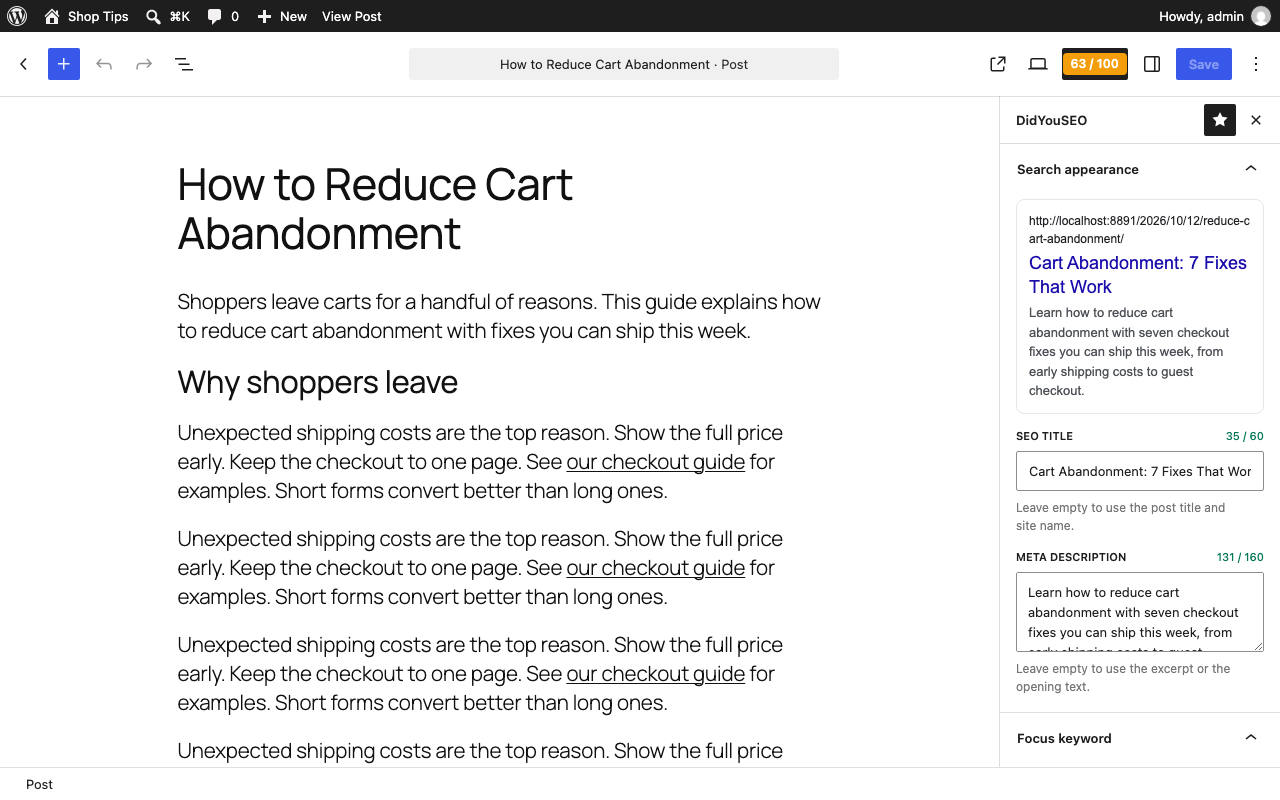
SEO title, meta description and canonical URL for every post and page, with character counters and a live Google preview.
Social and structured data
Open Graph and X tags with the featured image, and JSON-LD for your organisation, your website and every post.
Live writing checks
Set a focus keyword and get a Writing score from 0 to 100 that updates as you type.
Noindex in one click
Hide a post or page from search engines, and it's left out of the WordPress sitemap too.
Page audits
With a free DidYouSEO account, audit the published page for 40+ technical issues and see every fix in the editor.
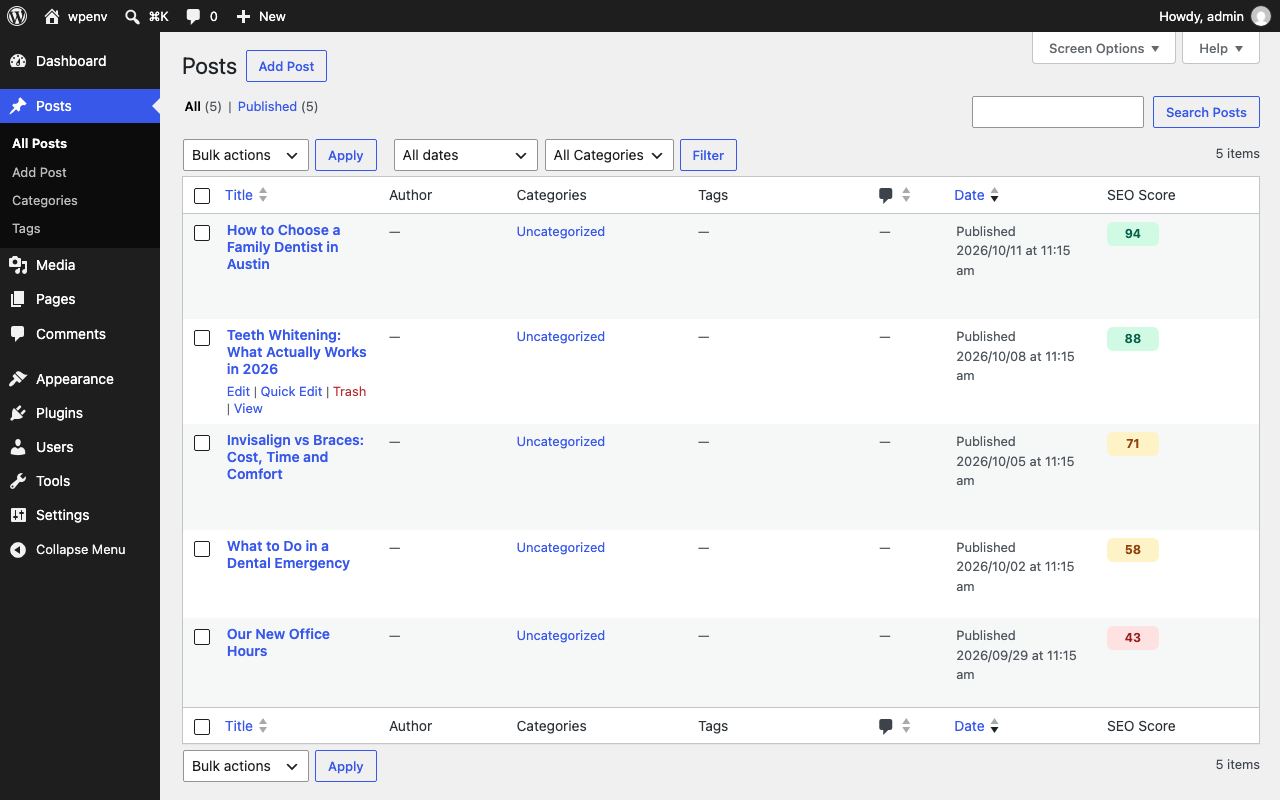
Scores in the Posts list
An SEO Score column for every post, a site score on the dashboard, and an alert when a score drops.
Search appearance for every post and page
- SEO title and meta description, with character counters and a live Google preview.
- Leave them empty and the plugin uses sensible defaults: "Post title - Site name", and the excerpt or opening text, trimmed to about 155 characters.
- Canonical URL for content that lives at more than one address.
- Noindex and nofollow per post or page. Hidden pages are left out of the WordPress sitemap.
- A homepage title and description, and a title separator, under Settings → DidYouSEO.
Tags the plugin adds to your pages
| Tag | What it does |
|---|---|
| SEO title and meta description | The title and snippet Google can show in results. |
| Canonical and robots rules | Tell search engines which address to index and which pages to skip, through WordPress's own functions. |
| Open Graph and X (Twitter) tags | Give shared links a title, description and the featured image. |
| JSON-LD structured data | Organization and WebSite for the site, and BlogPosting for each post, with the author, dates and featured image. |
A content optimization tool inside the editor
Set a focus keyword and the DidYouSEO sidebar checks the post as you write: the SEO title, meta description, URL, introduction, subheadings, image alt text, keyword density, content length, links and readability.
A question mark next to each check explains why it matters and how to fix it. The checks run in your browser and never send your content anywhere, and the Writing score in the editor toolbar updates as you type.
Page audits with a free DidYouSEO account
The writing checks look at your text. The audit looks at the published page, the way a search engine loads it: speed, structured data, accessibility, broken links and more, 40+ checks in all.
Connect a free account and you can audit a page from the editor, or automatically when you publish. Every problem shows in the editor with its fix, the Posts list gets an SEO Score column, the dashboard widget shows your site score, and you can get an alert when a score drops.
Each audit is one API request. The free plan includes 20 requests a day, and the dashboard widget only asks for your score once an hour.
From content calendar to scheduled post (Growth plan)
On the Growth plan, plan articles in your DidYouSEO content calendar and let AI write the drafts. You review every article on DidYouSEO, and when you approve it, it arrives in WordPress as a scheduled post, or as a draft if you prefer.
Nothing is published without your approval.
Why use DidYouSEO for WordPress SEO?
Works without an account
Tags, the Google preview and the live writing checks work as soon as you activate the plugin.
Checks the real page
The audit fetches the published page, so it catches problems your theme adds, such as slow scripts or broken links, not only problems in your text.
Your content stays on your site
The writing checks run in your browser. Audits fetch the public page, and post content is never sent from your site.
One account for everything
The same DidYouSEO account audits the whole site, connects Search Console and GA4, and tracks AI search, on didyouseo.com.
How do you set up the WordPress plugin?
- STEP 1
Install and activate
In WordPress, go to Plugins → Add New, search for DidYouSEO, install it and activate it. Titles, descriptions, social tags and structured data start to work immediately.
- STEP 2
Set your homepage
Go to Settings → DidYouSEO. Write the homepage title and description, and select a title separator.
- STEP 3
Connect for audits (optional)
Create a free account on didyouseo.com and make an API key under Settings → API Keys. Paste the key in Settings → DidYouSEO and click Connect.
Free tools for your WordPress posts
SERP preview
See how a title and description look in Google.
Meta tags checker
Check the tags on any published page.
Open Graph checker
Preview how a link looks when shared.
Schema checker
Test the JSON-LD on any page.
Full site audit
Audit every page of the site, not one post at a time.
Search Console reports
The searches that bring visitors to your posts.
What does the DidYouSEO WordPress plugin cost?
Free for one site. Paid plans start with a free trial and no card.
Free
Explore the dashboard, no card needed
- 1 registered site
- Up to 10 pages per audit
- 30 crawl credits / month
- 40+ on-page checks per page
- Bot traffic tracking
- AI visibility check
- AI content calendar
- AI credits for keyword & backlink lookups
- API & WordPress plugin (20 requests/day)
Starter
Fix your site's SEO
- 5,000 crawl credits / month (1 credit = 1 page)
- Up to 300 pages per crawl
- 1 website
- AI visibility: 1 website, 10 questions, 4 assistants
- Security, accessibility & best practices audits
- Bot traffic tracking
- Competitor tracking (2 competitors per site)
- Keyword gap analysis - top 20, refreshed monthly
- 100 AI credits / month for keyword & backlink lookups
- PDF & Markdown export
- AI content calendar
- API & WordPress plugin (500 requests/day)
- Branded reports with your logo
- Full white-label (remove DidYouSEO)
Growth
Track competitors and win their keywords
- Everything in Starter
- Bot traffic tracking
- Unlimited crawl credits
- Up to 500 pages per crawl
- 5 websites
- Competitor tracking (5 competitors per site)
- Keyword gap analysis - top 100, refreshed weekly
- AI visibility tracking (50 keywords, weekly)
- AI prompt tracking: 30 questions across your sites, 4 assistants
- 300 AI credits / month for keyword & backlink lookups
- API & WordPress plugin (1,000 requests/day)
- White-label reports and client share links
- AI content calendar - 30 articles per site / month, scheduled to WordPress
Compare every limit, add-on and the lifetime offer on the pricing page.
Frequently asked questions
Is the DidYouSEO WordPress plugin free?
Yes. The plugin is free on WordPress.org. The tags and live writing checks need no account. Page audits need a free DidYouSEO account, and the AI content calendar is on the Growth plan.
Do I need a DidYouSEO account to use the plugin?
No, not for the SEO title and description, social tags, structured data or the live writing checks. A free account adds page audits, the SEO Score column in the Posts list and the dashboard widget.
Where do I set the SEO title and meta description in WordPress?
In the block editor, open the DidYouSEO sidebar with the score button at the top right, and use Search appearance. Leave the fields empty to use the defaults.
Does the plugin send my post content anywhere?
No. The live checks run in your browser. When you audit a page, DidYouSEO fetches the public URL like a search engine would, and post content is never sent from your site.
Which WordPress versions does it support?
WordPress 6.2 or later, with PHP 7.4 or later.