
For freelancers and agencies
Client SEO reports your clients actually read
Enter a client's domain and get a client SEO report in under a minute: a health score, the fixes worth doing first, and copy-paste code for the developer. On a link you can send today.
No sign-up · 40+ checks · Shareable link
Why most SEO reports for clients go unread
The usual SEO report for a client is a 200-row export with a logo on top. The client sees a wall of red, doesn't know which line matters, and files it for later.
A report that gets approved puts the "so what" first: one score, a short list of what to do first, and how long each fix takes. The detail is still there for the developer, grouped by area instead of dumped. That's the order DidYouSEO builds every report in.
What should a client SEO report include?
Health score
One 0–100 number with a plain-English verdict, for the client.
Quick wins
The fixes worth doing first, each with an estimated time.
Findings by area
Titles, meta, headings, schema, mobile and links, grouped rather than dumped.
Copy-paste fixes
The exact tag or snippet to add, ready for the developer.
Search Console data
Connect the client's Search Console to show the queries and clicks behind the work.
Your branding
On paid plans, your logo and colours replace ours.
What is a client SEO report?
A client SEO report is the regular update an agency or freelancer sends a client to show what their SEO work changed: how the site performs in Google (and now in AI answers), why the numbers moved, and what happens next. Most go out monthly.
A good one is short. It leads with the result the client cares about, explains the change in plain words, and ends with the next steps. The raw data goes in an appendix, for whoever wants it.
The metrics that belong in an SEO report for a client
Lead with impact metrics (what the client gets), then health metrics (what you fixed). Pick the ones tied to the client's goal; a shop cares about sales from search, a local business about calls and visits.
| Metric | Where it comes from | What it tells the client |
|---|---|---|
| Organic clicks and top searches | Google Search Console | How many people found the site through Google, and with which searches |
| Organic sessions and conversions | Google Analytics 4 | Whether those visitors bought, signed up or got in touch |
| Positions for target keywords | Google Search Console | Which searches moved up or down, and the ones close to page one |
| AI visibility | ChatGPT, Claude, Gemini, Perplexity | Whether AI assistants name the client, or a competitor instead |
| Site health score | Site audit | Whether the technical problems you fixed are staying fixed |
| Referring domains | Backlink data | Whether more sites are linking to the client over time |
How to structure a client SEO report
- Start with a three-line summary: the main result, why it moved, and what you'll do next.
- Show impact metrics before health metrics. Clicks and leads first; the audit score after.
- Explain every drop honestly. A dip with a reason (an algorithm update, a seasonal low) builds more trust than a report that hides it.
- End with three next steps, each with who does it and by when.
- Keep the detail for the developer in a separate section or a CSV, not in the client's summary.
A sample client SEO report
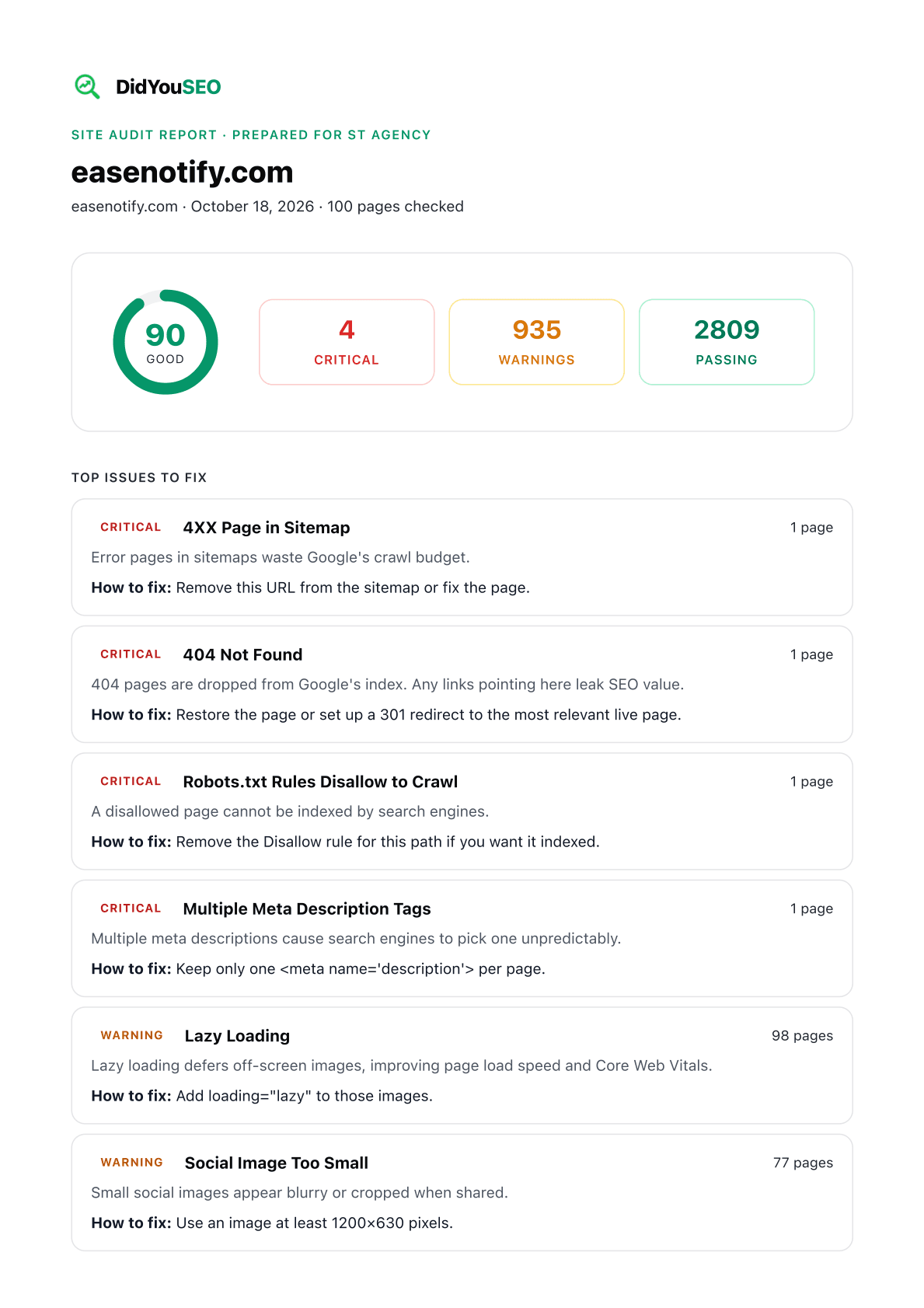
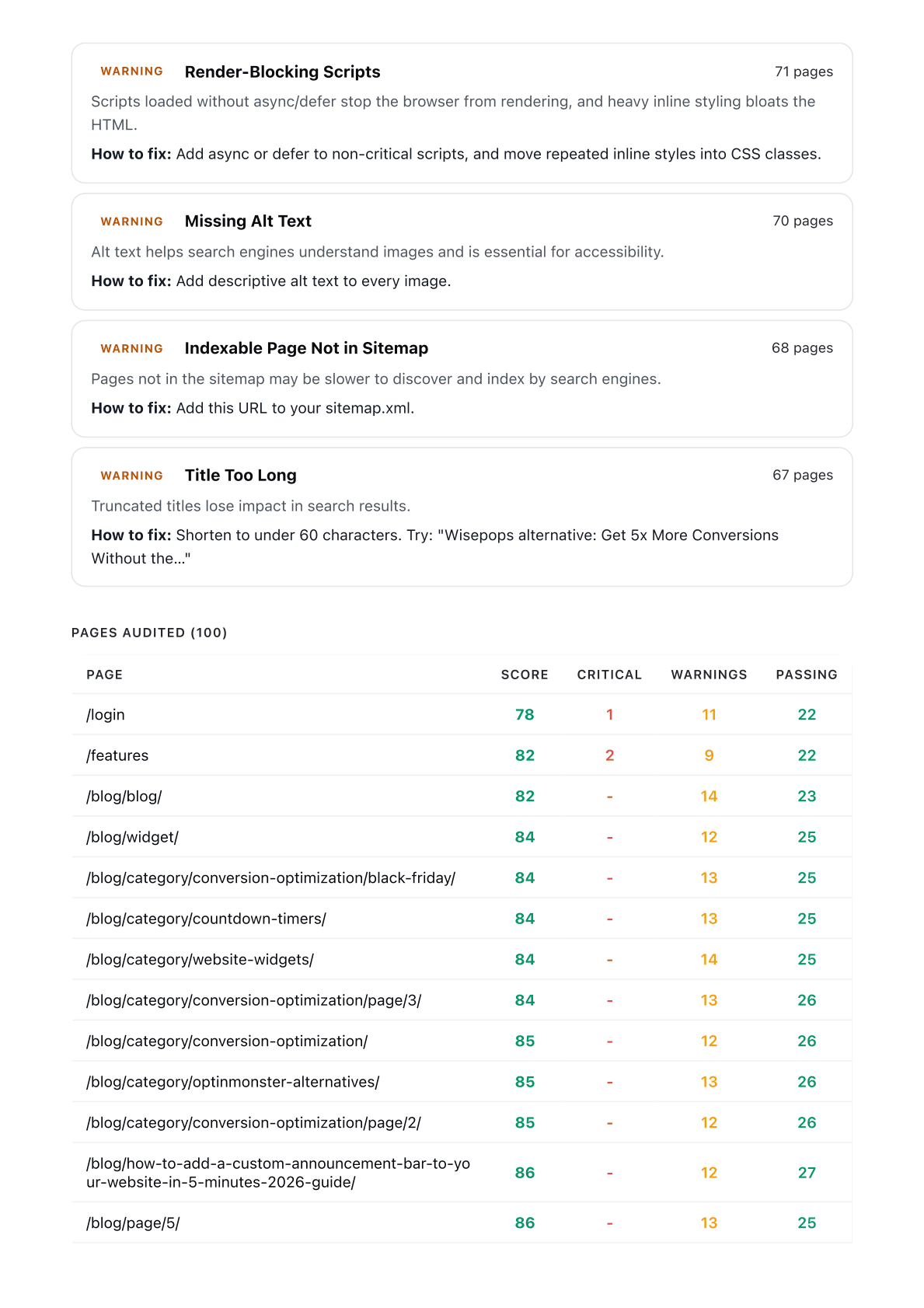
This is a real report, not a mock-up. We audited easenotify.com, another product from the DidYouSEO team, on October 18, 2026: 100 pages, a score of 90 and 4 critical issues. Nothing was edited after the report was made.
Page one is what the client reads: the score, the issue counts, and the top issues with a one-line fix for each. The pages after it list every page audited with its own score, for whoever makes the fixes. The "Prepared for" line shows your client's name, and the logo you add in DidYouSEO replaces ours at the top and in the footer.
Four ways to deliver a client SEO report
Shareable link
Every report lives at its own URL. The client doesn't need an account to read it.
PDF and Markdown
Save a full site-audit report as a PDF for the client, or as Markdown for your own document.
Issue-level CSV
One row per failing check per page: the version you hand to whoever fixes things.
Search Console data
Show the real queries, clicks and position changes behind the work.
How to create a client SEO report in five minutes
- Run the free report above on the client's domain to get the score and quick wins.
- Sign up free and add the site to audit more pages and keep the history.
- Connect the client's Search Console to add queries, clicks and position changes.
- Add your branding, then share the report link or print it to PDF.
- Re-run the audit each month so the client sees the score move.
From one-off audit to monthly client SEO reporting
- Add the client's site once and re-run the audit each month to show the score moving.
- Connect Search Console to report the queries and pages that gained or lost clicks.
- Connect GA4 to show organic sessions, conversions and visits from AI assistants.
- Track named competitors and get a daily digest when they change titles or publish pages.
- Check whether ChatGPT, Claude, Gemini and Perplexity mention the client's brand (paid plans).
How is this client SEO report different?
Free, with no sign-up
The first report on any domain costs nothing and needs no account.
Written for the client
Score and quick wins first; the detail for the developer comes after.
Fixes, not just findings
Each problem comes with a copy-paste fix and a time estimate.
Grows with the account
Add Search Console, GA4, competitors and AI visibility as the engagement grows.
How does it work?
- STEP 1
Enter the domain
Type the client's website above. No account needed.
- STEP 2
Read the report
Score, quick wins and fixes, ready in about a minute.
- STEP 3
Send the link
Share the report URL, or sign up to brand it and track it monthly.
Turn the report into a client email with Claude or ChatGPT
Connect DidYouSEO to your AI assistant and it can explain the report to a non-technical client, using the real findings for their site.
“Summarise acme.com's SEO report for the owner in five bullet points.”
“Which three fixes should acme.com do first, and why?”
“Write the client email that goes with acme.com's report.”
“What changed on acme.com since the last audit?”
More for client SEO work
How much does client SEO reporting cost?
Free for one site. Paid plans start with a free trial and no card.
Free
Explore the dashboard, no card needed
- 1 registered site
- Up to 10 pages per audit
- 30 crawl credits / month
- 40+ on-page checks per page
- Bot traffic tracking
- AI visibility check
- AI content calendar
- AI credits for keyword & backlink lookups
- API & WordPress plugin (20 requests/day)
Starter
Fix your site's SEO
- 5,000 crawl credits / month (1 credit = 1 page)
- Up to 300 pages per crawl
- 1 website
- AI visibility: 1 website, 10 questions, 4 assistants
- Security, accessibility & best practices audits
- Bot traffic tracking
- Competitor tracking (2 competitors per site)
- Keyword gap analysis - top 20, refreshed monthly
- 100 AI credits / month for keyword & backlink lookups
- PDF & Markdown export
- AI content calendar
- API & WordPress plugin (500 requests/day)
- Branded reports with your logo
- Full white-label (remove DidYouSEO)
Growth
Track competitors and win their keywords
- Everything in Starter
- Bot traffic tracking
- Unlimited crawl credits
- Up to 500 pages per crawl
- 5 websites
- Competitor tracking (5 competitors per site)
- Keyword gap analysis - top 100, refreshed weekly
- AI visibility tracking (50 keywords, weekly)
- AI prompt tracking: 30 questions across your sites, 4 assistants
- 300 AI credits / month for keyword & backlink lookups
- API & WordPress plugin (1,000 requests/day)
- White-label reports and client share links
- AI content calendar - 30 articles per site / month, scheduled to WordPress
Compare every limit, add-on and the lifetime offer on the pricing page.
Who it's for
Frequently asked questions
What is a client SEO report?
A regular update, usually monthly, that shows a client what their SEO work changed: how the site performs in Google and AI answers, why the numbers moved, and what happens next.
How long does it take to make an SEO report for a client?
Collecting the data by hand from Search Console, GA4 and an audit tool usually takes a few hours per client. Here the audit report is ready in about a minute, and Search Console and GA4 data is pulled in automatically once connected, so your time goes on the summary and next steps.
Should client SEO reports be automated?
Automate the data, not the story. Pulling numbers by hand is slow and error-prone, but the summary (what moved, why, and what's next) is the part the client reads, and it needs a person who knows the account.
What is the most important metric in a client SEO report?
The one tied to the client's goal: leads or sales from organic search if you can measure them, otherwise organic clicks from Search Console. Rankings and audit scores explain the result; they aren't the result.
What should a client SEO report include?
Four things: an overall health score, the few fixes worth doing first, the full findings grouped by area, and a clear next step. Clients mostly read the first two; developers work from the rest.
Is this client SEO report generator free?
Yes. Enter any domain and the report is generated free with no sign-up. A free account adds multi-page site audits; paid plans start at $19 a month.
Can I white-label the report with my agency's logo?
Yes. On any paid plan, reports carry your company name, logo, colour and footer, and each client can have its own logo. On Growth and Pro you can also remove "Made with DidYouSEO".
How often should I send clients an SEO report?
Monthly suits most retainers: often enough to show momentum, rarely enough that rankings have time to move. Send a technical audit when you take on a client and after any migration or redesign.
Does the report include AI search visibility?
The dashboard tracks whether ChatGPT, Claude, Gemini and Perplexity mention a brand, on the Growth plan. The free public report covers on-page technical SEO.
Recommended articles
Free SEO audit report template
The six sections clients read, and what to cut.
How to write a monthly SEO report
A report a client reads in five minutes.
How much does an SEO audit cost?
What to charge, and what clients expect for it.
Track competitor SEO moves
Add competitor changes to the monthly report.
More seo reporting software
This is one part of DidYouSEO's seo reporting software. The same account covers these jobs too:
White-label SEO reports
Your agency's name, logo and colours on every report, and a share link with no login.
GA4 SEO reporting
Organic sessions, landing pages, conversions and visits from AI assistants, read from GA4.
Search Console reporting
The queries and pages that gained or lost clicks, and the keywords sitting on page two.
Competitor SEO tracking
A daily digest when a competitor changes a title, publishes a page or loses one.